
A Libra customer support agent may request for a photo from you to verify your identity before proceeding with your support request.
Verification Photo
The following are required in the verification photo:
- A view of your full face.
- Your ID that was used to register with Libra. This was either a passport or driver's license. If your ID has expired, you may upload the picture using your newly issued ID.
- A hand-written note that states the current date and an additional word or series of numbers which is provided by Libra underneath.
- Please ensure that the image is saved as a JPEG or JPG file type.
IMPORTANT: Do not send the photo to any third party. The photo must be sent via the SendSafely link provided by Libra.
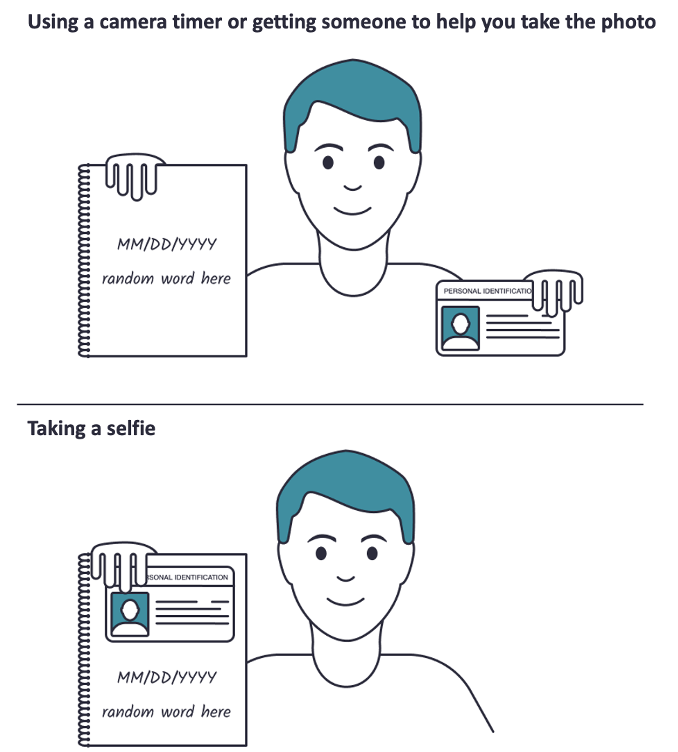
| DOs |
DONTs |
|
|
How many photos |
Send only 1 photo |
Send 3 separate photos of your face, ID and note |
|
What ID to use |
Hold up the ID which was used to register for your Libra account (Passport or Driver's License). If your ID has expired, you may use your newly issued ID. |
Use a scanned copy of your ID for your photo |
|
Where to take the photo |
In a location with good lighting and ensure all details on your ID are legible. |
Use flash in a dark room. It will cause glare in your photo and information on your ID might get obscured. |
|
How to take the photo |
Full view of your ID, note and your face |
Cover essential/material information on your ID |
|
How to send |
Chat with a live agent and send it in the secure chat after logging in. |
Send via an attachment in your email |
Comments
0 comments
Article is closed for comments.